From Snowplow Silver to a Gold Star Schema
How we turn Snowplow’s unified views, sessions and users into facts and dimensions that analysts can trust.
 Nitin Jain
The Snowplow dbt packages give you a very good Silver layer. The unified package builds snowplow_unified_views, snowplow_unified_sessions and snowplow_unified_users, and they are wide, clean and well tested. But wide tables are not a reporting model. Every analyst who joins them writes their own rules for brand, region, page type and article. Six months later you have six definitions of “a page view on the sports section”.
On a recent project for a large digital publisher with several news brands, web and mobile apps, we put a Gold star schema on top of Snowplow Silver. This post is the set of rules we settled on. None of them are new. Kimball wrote most of them down decades ago. What is useful is seeing how they apply to behavioural data, where the source is a stream of events and the descriptions arrive late, change often, or never arrive at all.
The shape of the model
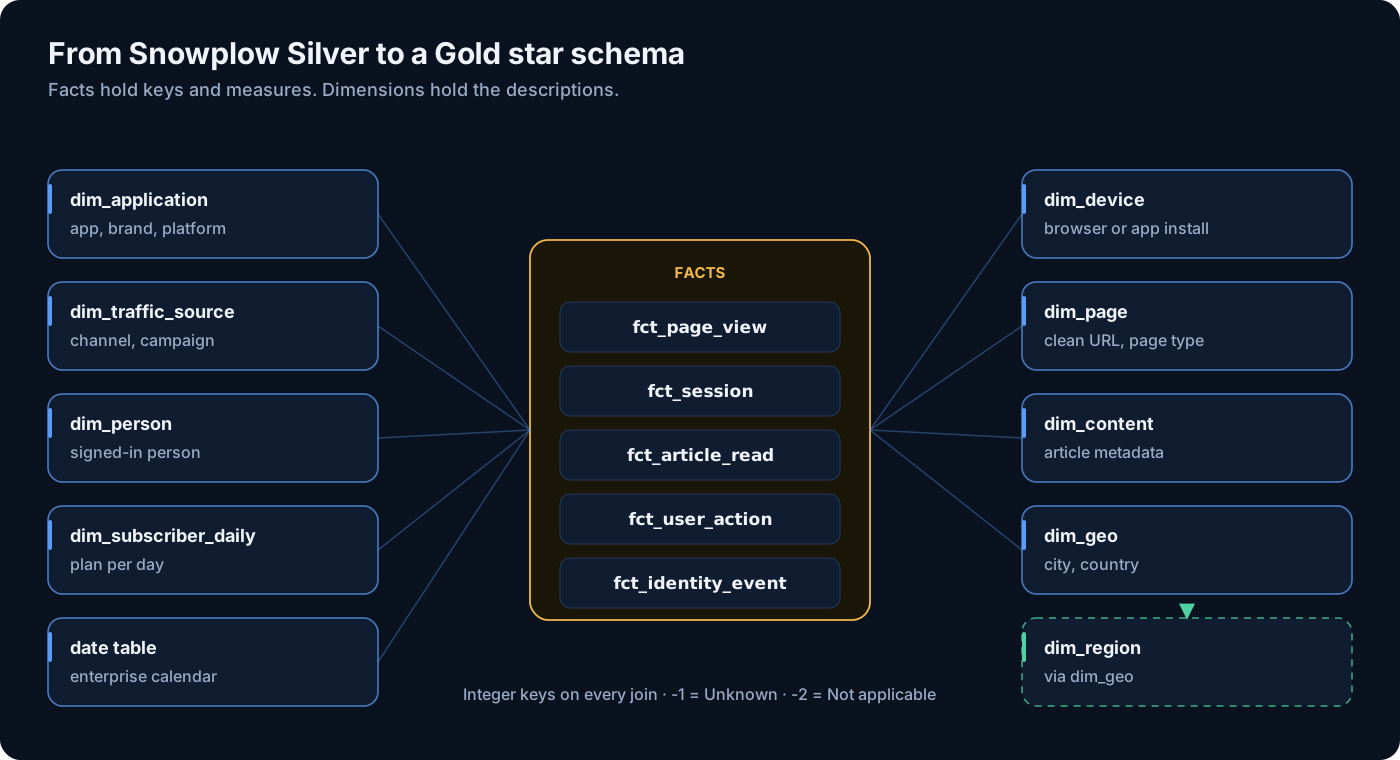
Five facts sit in the middle. Each has one clear grain:
- fct_page_view: one row per page view or app screen view, with engaged time and scroll depth.
- fct_session: one row per session, with counts and duration.
- fct_article_read: one row per view that meets the business’s definition of a read (for example, a minimum engaged time on an article page).
- fct_user_action: one row per click, install, app background or foreground, or custom event. The unified package only keeps these as counts, so we model them ourselves.
- fct_identity_event: one row per login, sign-up or account link, which is what lets us tie anonymous devices to known people.
Around them sit the dimensions: dim_application, dim_traffic_source, dim_geo, dim_region, dim_person, dim_device, dim_page, dim_content and dim_subscriber_daily. For dates we join to the enterprise date table the finance team already owns. Do not build another one. The business already agrees on fiscal weeks, holidays and quarter ends in that table, and a second calendar is a second argument.
Rule 1: integer surrogate keys on every join
Every dimension gets an integer surrogate key, and every fact stores that key. We do not join facts to dimensions on strings like app_id, URLs or country codes. There are three reasons.
- Speed and size. A fact with a few billion rows and ten string join columns is much heavier than the same fact with ten integers. Joins on integers are cheaper, and the columns compress better.
- History. A type 2 dimension has several rows for the same natural key. The surrogate key points to the exact version that was true when the event happened. A natural key cannot do that.
- Stability. Natural keys get renamed, recased and cleaned. If a URL rule changes, we fix it in the dimension, and the fact keeps pointing at the same key.
We generate keys with a sequence or an identity column in Snowflake rather than a hash. Hashes are fine for natural-key lookups, but they are wide, they are not ordered, and they make type 2 versions awkward.
Rule 2: -1 means Unknown, -2 means Not applicable
Every dimension has two fixed rows. Key -1 is Unknown: the event should have a value, but we did not get one or could not match it. Key -2 is Not applicable: the event can never have a value. A home page view has no article, so its content_key is -2. An article view whose article ID did not match is -1.
The difference matters. A rising share of -1 is a data quality problem and should alert someone. A rising share of -2 is just a change in the mix of traffic. If you collapse both into NULL, you lose that signal, and inner joins quietly drop rows. With the two fixed rows, every fact row joins to every dimension, always, and row counts stay honest.
Rule 3: facts hold keys, IDs, timestamps and measures only
A fact row in our model holds four kinds of column and nothing else:
- Surrogate keys to each dimension.
- Degenerate IDs that have no dimension of their own but are needed for drill-through and joins:
event_id,view_id,session_identifier,user_identifier. - Timestamps in UTC, plus a
date_keyfor the enterprise calendar. - Measures: engaged seconds, scroll depth, view counts, event counts.
Page titles, browser names, country names, referrer domains and campaign names all live in dimensions. It is tempting to leave a few on the fact “for convenience”. Resist it. The moment a description lives in two places, someone will report from the wrong one, and a fix to the dimension will not reach the fact.
Rule 4: choose type 2 or type 1 per dimension, and per column
Not every dimension needs history. We decided one dimension at a time, and inside the type 2 ones, one column at a time. This is the table we agreed with the business (illustrative, simplified):
| Dimension | Type | Tracked columns (new version) | Updated in place |
|---|---|---|---|
| dim_person | Type 2 | country, account status, consent status | first_seen_at, last_seen_at, email domain corrections |
| dim_content | Type 2 | section, paywall flag, content type | headline typo fixes, word count, first/last seen |
| dim_application | Type 1 | none | brand, platform, is_test flag |
| dim_device | Type 1 | none | device class, OS family, browser family |
| dim_page | Type 1 | none | page type, section, first/last seen |
| dim_traffic_source | Type 1 | none | channel grouping |
| dim_geo | Type 1 | none | city, country, region_key |
| dim_subscriber_daily | Daily snapshot | n/a (one row per subscriber per day) | n/a |
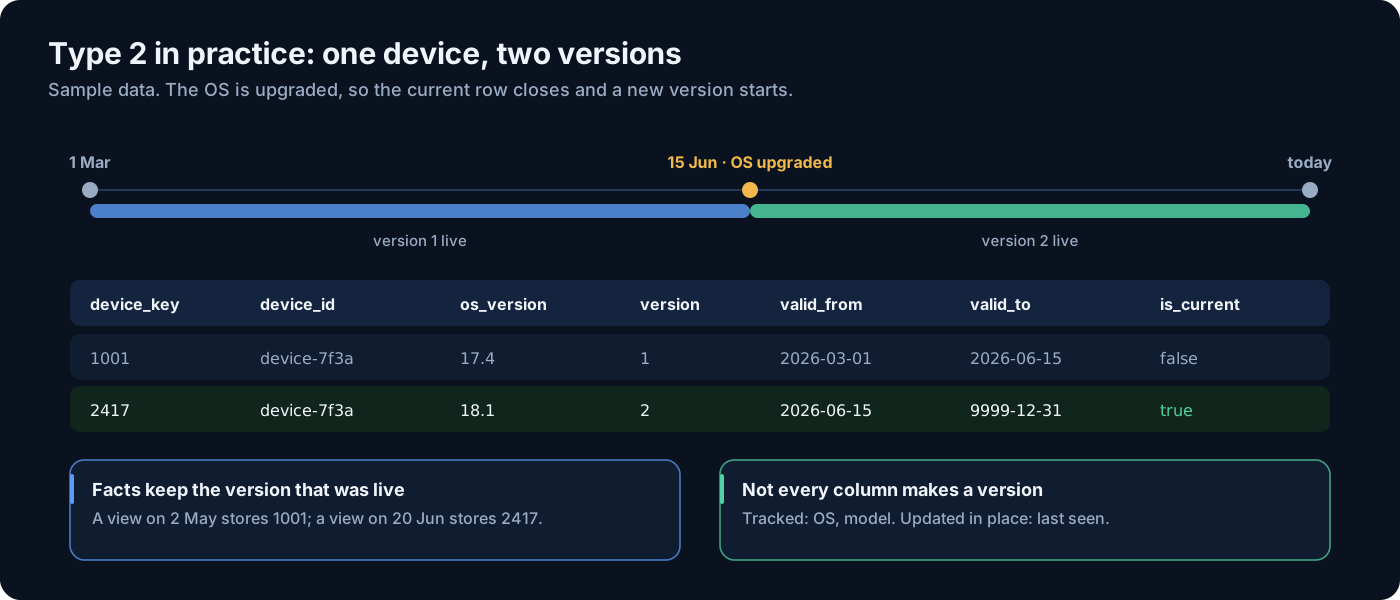
Type 2 rows carry four extra columns: version_no, valid_from, valid_to and is_current. The open version has valid_to = 9999-12-31 and is_current = true.
The rule that saved us the most arguments: a column is either tracked or updated in place, never both, and the list is written down. A tracked column opens a new version when it changes. An in-place column overwrites every version. Columns like first_seen_at and last_seen_at are never tracked. If they were, every person who visits every day would get a new version every day, and the dimension would grow as fast as the fact.
Here is the generic pattern for a type 2 load. It closes versions whose tracked columns changed, then inserts new versions. In-place columns are handled by a separate update.
sql-- 1. Latest attributes per person from Silver (sample source)
create or replace temporary table stg_person as
select
    person_id,
    country_code,
    account_status,
    consent_status,
    hash(country_code, account_status, consent_status) as tracked_hash
from analytics.silver.person_latest;

-- 2. Close the current version when a tracked column changed
update analytics.gold.dim_person d
set    valid_to   = current_timestamp(),
       is_current = false
from   stg_person s
where  d.person_id   = s.person_id
  and  d.is_current
  and  d.tracked_hash <> s.tracked_hash;

-- 3. Insert a new version for new people and changed people
insert into analytics.gold.dim_person (
    person_key, person_id, country_code, account_status, consent_status,
    tracked_hash, version_no, valid_from, valid_to, is_current)
select
    analytics.gold.seq_person_key.nextval,
    s.person_id, s.country_code, s.account_status, s.consent_status,
    s.tracked_hash,
    coalesce(prev.max_version, 0) + 1,
    current_timestamp(),
    '9999-12-31'::timestamp,
    true
from stg_person s
left join (
    select person_id, max(version_no) as max_version
    from analytics.gold.dim_person
    group by person_id
) prev on prev.person_id = s.person_id
where not exists (
    select 1 from analytics.gold.dim_person d
    where d.person_id = s.person_id and d.is_current
);
In dbt you can get most of this from snapshots, but we found an explicit model easier to reason about once the in-place columns and the fixed -1 and -2 rows were added.
Rule 5: late-arriving content gets a placeholder, updated in place
Behavioural events arrive in seconds. Article metadata from the CMS often arrives later, sometimes hours later, sometimes not until someone fixes a feed. On our project the content entity was not on the events at all at first, so for a while every article view was waiting on a description.
The answer is to never make the fact wait. Before the fact load, we insert a placeholder row into dim_content for every article ID seen in the new events that is not yet in the dimension. The placeholder takes what the event can tell us: the page title as the headline, the URL path, the first-seen time, and a flag is_placeholder = true. The fact then gets a real key straight away.
When the CMS row arrives, we update the placeholder in place: same key, real headline, real section, real author, flag cleared. We do not open a type 2 version for this. The placeholder was never “true” history, just a gap. Because the key never changes, no fact rows need to be touched. From that point on, normal type 2 rules apply to the tracked columns.
Count the placeholders every day. A small, steady number is normal. A rising one means the CMS feed is broken, and that is worth an alert.
Rule 6: a clean-URL page dimension
Raw page URLs are a poor dimension. The same page appears with tracking parameters, with and without a trailing slash, in upper and lower case. If you key dim_page on the raw URL you get millions of rows that all mean the same handful of pages.
We key it on a clean URL: host plus path, lower-cased, query string and fragment removed, trailing slash removed. Snowplow already splits the URL into parts (page_urlhost, page_urlpath, page_urlquery), which makes this simple. The query string is not lost. Campaign parameters belong in dim_traffic_source, which is where analysts look for them anyway.
Each clean URL then gets a page_type from ordered rules: home page, section front, article, video, search, account, other. The rules are data, not code: a small reference table with a pattern, a priority and a page type, owned by the team that owns the site structure. The first matching rule wins. When a new section launches, they add a row, and the next run re-classifies the pages.
Rule 7: region lives on the geo dimension
The business reports by region (for example, North America, Europe, Asia Pacific). It is tempting to add a region_key to every fact. We put it on dim_geo instead, and dim_region joins through it. Region is a property of a place, not of an event. If the business moves a country from one region to another, we update one column on a few hundred geo rows, not billions of fact rows. This is the one deliberate snowflake in an otherwise flat star, and it is worth it.
Rule 8: no hardcoded reference lists
The fastest way to make a model wrong is a case statement like when app_id = 'brand_a-web' then 'Brand A'. It works on the day it is written. Then a new app launches, nobody edits the SQL, and the new app reports as “Other” for a quarter.
Brand per app, region per country, page type per URL pattern, channel per referrer: all of these come from reference data. In order of preference:
- Have the tracker send it. A site or page entity on every event that carries the brand is better than any lookup.
- Use the business’s own reference tables where they exist, such as a master list of brands and properties.
- Use a dbt seed owned by the team that owns the data, with a review step, when there is no system of record yet.
Any value that is not in the reference data maps to -1, and the count of -1 rows is a test. A new app shows up as a failing test the day it starts sending events, not as a mystery in next quarter’s numbers.
Why a dimension unions several unified tables
It seems natural to build dim_device or dim_traffic_source from snowplow_unified_views alone. But every fact must find its key, and fct_session and fct_user_action read from other tables. Some values only exist there: for example, sessions whose view rows were filtered out, or attributes that are set at session level. If the dimension does not have them, those fact rows fall to -1 for no good reason.
So each dimension is built from the union of distinct values across the unified tables its facts use. Before adding another source to that union, we measure what it adds. Here is the kind of check we run (sample data, illustrative numbers):
| Dimension | Distinct values in views | Also in sessions | Only in sessions | Share only in sessions |
|---|---|---|---|---|
| dim_device | 40,000 | 39,800 | 200 | 0.5% |
| dim_traffic_source | 25,000 | 24,900 | 100 | 0.4% |
| dim_geo | 60,000 | 59,700 | 300 | 0.5% |
| dim_application | 20 | 20 | 0 | 0% |
The numbers are small, but they are not zero, and a small number of unmatched keys in a finance-facing report is enough to lose trust. Where the union adds nothing, as for applications here, we skip the extra scan and save the compute.
Loading a fact
With all of that in place, a fact load is mostly lookups. Every key is wrapped in coalesce(key, -1), and the -2 cases are written out explicitly. Type 2 dimensions join on the event time falling inside the version window.
sqlinsert into analytics.gold.fct_page_view (
    event_id, view_id, session_identifier, user_identifier,
    date_key, application_key, page_key, content_key,
    device_key, geo_key, traffic_source_key, person_key,
    derived_tstamp, engaged_time_in_s, vertical_percentage_scrolled)
select
    v.event_id,
    v.view_id,
    v.session_identifier,
    v.user_identifier,
    coalesce(dd.date_key, -1),
    coalesce(da.application_key, -1),
    coalesce(dp.page_key, -1),
    case
        when dp.page_type <> 'article' then -2   -- not applicable
        else coalesce(dc.content_key, -1)        -- unknown
    end,
    coalesce(dv.device_key, -1),
    coalesce(dg.geo_key, -1),
    coalesce(dt.traffic_source_key, -1),
    case
        when v.person_id is null then -2         -- anonymous view
        else coalesce(pr.person_key, -1)
    end,
    v.derived_tstamp,
    v.engaged_time_in_s,
    v.vertical_percentage_scrolled
from analytics.silver.new_views v
left join enterprise.calendar.dim_date dd
       on dd.calendar_date = v.derived_tstamp::date
left join analytics.gold.dim_application da
       on da.app_id = v.app_id
left join analytics.gold.dim_page dp
       on dp.clean_url = v.clean_url
left join analytics.gold.dim_content dc
       on dc.content_id = v.content_id
      and v.derived_tstamp >= dc.valid_from
      and v.derived_tstamp <  dc.valid_to
left join analytics.gold.dim_device dv
       on dv.device_natural_key = v.device_natural_key
left join analytics.gold.dim_geo dg
       on dg.geo_natural_key = v.geo_natural_key
left join analytics.gold.dim_traffic_source dt
       on dt.traffic_source_natural_key = v.traffic_source_natural_key
left join analytics.gold.dim_person pr
       on pr.person_id = v.person_id
      and v.derived_tstamp >= pr.valid_from
      and v.derived_tstamp <  pr.valid_to;
Note the order of work in each run: placeholder content rows first, then dimensions, then facts. If you load the fact first, late content falls to -1 and stays there until someone rebuilds it.
What this buys you
- One definition of brand, region, page type and article, in one place each.
- Every fact row joins to every dimension, so counts match between reports.
- Data quality shows up as numbers you can test: share of
-1keys, count of placeholder articles, rows mapped to no reference value. - History where the business needs it, and cheap type 1 updates everywhere else.
- A clean base for the aggregates and semantic views that sit on top.
The Snowplow packages answer “what happened”. The star schema answers “what does it mean for the business”. Keep the two jobs separate and both get easier.
Building a reporting model on Snowplow?
We help teams turn Snowplow Silver into a Gold star schema that analysts trust: key design, SCD rules, reference data and the tests that keep it honest.
Frequently Asked Questions
Why not report straight from the Snowplow unified tables?
You can for simple questions. But every analyst then writes their own rules for brand, page type, region and article, and the numbers drift apart. A star schema puts each rule in one dimension and gives every report the same answer.
What is the difference between the -1 and -2 keys?
-1 means Unknown: the event should have a value but we could not find or match it, which is a data quality issue. -2 means Not applicable: the event can never have a value, such as the article on a home page view. Keeping them apart lets you alert on one and ignore the other.
Which dimensions should be SCD type 2?
Only the ones where the business needs to report on what was true at the time, usually people and content. Even then, decide column by column. Fast-moving columns like first and last seen timestamps should be updated in place, or the dimension grows as fast as the fact.
How do you handle articles that appear in events before the CMS sends their metadata?
Insert a placeholder row in the content dimension before the fact load, using what the event knows (page title, URL). The fact gets a real key at once. When the CMS row arrives, update the placeholder in place. The key never changes, so no fact rows need fixing.
Where should mappings like brand per app or region per country live?
Not in model SQL. Best is for the tracker to send the value on every event. Next best is the business’s own reference tables, then a dbt seed owned by the team that owns the data. Unmapped values go to -1 and are caught by a test.
Need help building your data platform?
At CData Consulting, we design, build, and operate modern data infrastructure for companies across North America. Whether you are planning a migration, optimizing costs, or building from scratch — let's talk.
Get data engineering insights delivered to your inbox
Join our newsletter for weekly insights on Snowflake, data architecture, and modern analytics.