The Snowplow dbt Packages in Practice: Unified, Media, Ecommerce and Attribution
What each package builds, which events it models, what it quietly leaves out, and the gotchas that cost us days.
 Nitin Jain
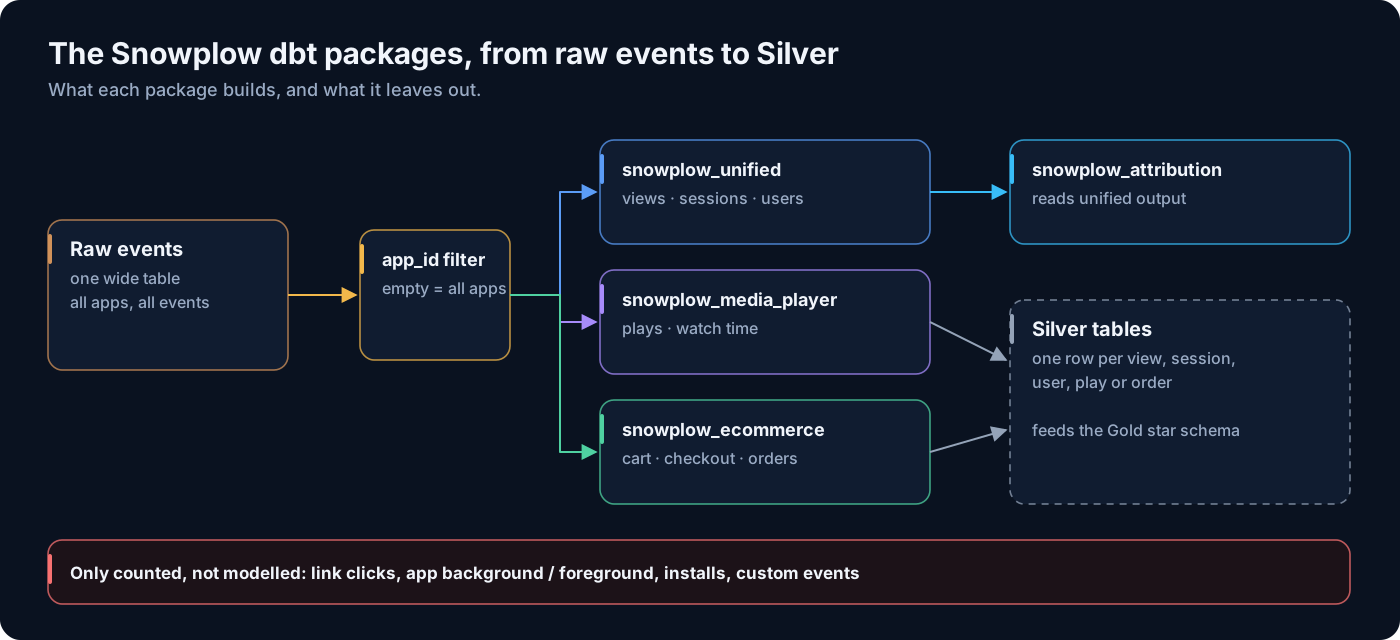
In the first post of this series we laid out the architecture: trackers, collector, enrichment and a loader that lands every event in one raw table, then Silver, Gold and serving layers on top. This post is about the step from raw events to Silver. On Snowplow that step is mostly done by Snowplow’s own dbt packages, and on a recent project for a multi-brand media company with several news sites and mobile apps, they did most of the heavy lifting.
The packages are good. They are also opinionated, and the opinions are easy to miss. Below is what each package builds, which events it actually reads, what it does not model, and the gotchas we hit. Every table and variable name here is from Snowplow’s public docs and package source. Every number is sample data.
The four packages at a glance
All four packages read the same raw events table (by default atomic.events). Unified, media player and ecommerce each run their own incremental logic with their own manifest. Attribution sits downstream of unified and reads its output tables, not the raw events.
| Package | Main tables | Events it models | Off by default |
|---|---|---|---|
| snowplow_unified | snowplow_unified_views, snowplow_unified_sessions, snowplow_unified_users, snowplow_unified_user_mapping | page_view, screen_view, page_ping (plus screen_end and app background/foreground for screen engagement when the screen summary context is on) | App errors, conversions, consent, core web vitals, most extra contexts |
| snowplow_media_player | snowplow_media_player_base, snowplow_media_player_plays_by_pageview, snowplow_media_player_media_stats, ad tables | Media events and the media player context (v2 schemas; v1 for YouTube and HTML5) | Mobile events, ads, session and user stats tables |
| snowplow_ecommerce | snowplow_ecommerce_cart_interactions, _checkout_interactions, _product_interactions, _transaction_interactions, _sessions | snowplow_ecommerce_action events with their product, cart, checkout and transaction entities | Mobile events |
| snowplow_attribution | snowplow_attribution_paths_to_conversion, _channel_attributions, _campaign_attributions, _path_summary, _overview | None directly; reads unified views, conversions and user mapping | Paths to non-conversion |
One housekeeping item before anything runs: recent versions of these packages need snowplow__license_accepted: true. They are released under the Snowplow Personal and Academic License, so commercial use needs a Snowplow agreement. Check that with whoever owns your vendor contracts, not after go-live.
snowplow_unified: views, sessions, users
Unified replaced the older separate web and mobile packages. It treats a web page view and an app screen view as the same thing, a view, and builds three grains on top:
snowplow_unified_views: one row perview_id. Rows come frompage_viewandscreen_viewevents. Page pings add engaged time and scroll depth to the web rows.snowplow_unified_sessions: one row persession_identifier, with first and last page or screen, marketing source, device and geo fields, aviewscount and engaged time.snowplow_unified_users: one row peruser_identifier, with first-touch and last-touch fields across all of that user’s sessions.snowplow_unified_user_mapping: maps eachuser_identifier(the cookie or device ID) to the latest knownuser_id. Withsnowplow__session_stitchingon (the default), this feeds astitched_user_idback onto sessions.
Extra web and mobile fields come from contexts you switch on one by one: snowplow__enable_yauaa, snowplow__enable_iab, snowplow__enable_mobile_context, snowplow__enable_application_context, snowplow__enable_screen_summary_context and others. They are off by default because the package checks the columns exist and fails if they do not. Turn on only what your trackers actually send.
Then there are the optional modules, each behind its own flag:
- Conversions (
snowplow__enable_conversions): you define conversions insnowplow__conversion_events, each with aname, a SQLconditionand an optionalvalue. You get asnowplow_unified_conversionstable pluscv_<name>_volume,cv_<name>_convertedand, when a value is set,cv_<name>_totalcolumns on sessions. - App errors (
snowplow__enable_app_errors): buildssnowplow_unified_app_errorsfrom the mobile trackers’application_errorevents. - Consent (
snowplow__enable_consent): a set ofsnowplow_unified_consent_*tables for consent logs, versions and totals. - Core web vitals (
snowplow__enable_cwv):snowplow_unified_web_vitalsandsnowplow_unified_web_vital_measurements.
What unified does not model
This is the part that surprises people. Unified builds rows from views and engagement events only. Everything else in your raw table, such as link clicks, form submissions, app installs, app background and foreground (unless you use them for screen engagement), and every custom event your team defined, does not get its own row anywhere in Silver.
The most you get is a count. If you set snowplow__list_event_counts: true, each session gets an event_counts column holding a small JSON object like {"page_view": 6, "link_click": 3, "article_share": 1} (sample). The total_events column counts every event in the session. That is useful for a quick sense check, but you cannot join it to a content dimension or ask which article got shared.
If an event matters to the business, list it explicitly and decide where it lives. “It’s in Snowplow” is not the same as “it’s in the model”.
You have three options for those events. If it is a conversion, define it in snowplow__conversion_events. If it needs to travel with a view or session, add it through snowplow__view_passthroughs, snowplow__session_passthroughs or the aggregation variables. If it is a behaviour in its own right, such as shares, saves or newsletter sign-ups, build your own model. On our project that became a user-action fact in Gold, built from the raw events with the same session and user identifiers as unified, so it joins cleanly to everything else.
Media player and ecommerce: separate packages, separate gaps
snowplow_media_player turns media events into one row per play in snowplow_media_player_base (keyed by play_id), a plays-only version in snowplow_media_player_plays_by_pageview, and per-media totals in snowplow_media_player_media_stats. It reports play time, percent progress (the boundaries come from snowplow__percent_progress_boundaries, default 10, 25, 50, 75) and a completion flag. Ad tables and the session and user stats tables are off by default.
The trap: snowplow__enable_mobile_events is false by default in the media player package. If your video plays in the app as well as on the web, app plays are not modelled until you switch it on. The ecommerce package has the same flag with the same default.
snowplow_ecommerce reads snowplow_ecommerce_action events from the ecommerce tracking plugin and splits them into cart, checkout, product and transaction interaction tables, then rolls them up into snowplow_ecommerce_sessions. The tables reflect what the tracker sends, no more. On a subscription site where only the final purchase was tracked, the transaction table filled up and the cart, checkout and product tables stayed empty. Nothing was broken. There was simply no data for those steps. If someone asks for a checkout funnel, the fix is in the tracking plan, not in dbt.
snowplow_attribution: downstream of unified
Attribution does not read raw events. Its sources are variables pointing at unified output: snowplow__conversions_source (by default snowplow_unified_conversions), snowplow__conversion_path_source (snowplow_unified_views) and snowplow__user_mapping_source. That means conversions must be enabled in unified first. It supports first_touch, last_touch, linear and position_based models, looks back snowplow__path_lookback_days (default 30) before each conversion, and the overview can show return on ad spend if you point snowplow__spend_source at a spend table by channel or campaign.
Our advice: get unified right and stable first. Attribution amplifies whatever is wrong in your sessions and channel classification.
Gotcha 1: the app_id allow-list drops data silently
Every package has a snowplow__app_id variable. The default is an empty list, which means process every app. Once you put anything in it, the package filters to exactly those values. Under the hood the filter is app_id in (...), so rows with a null or empty app_id fall out as well.
On our project the production config still held a short allow-list from an early pilot. Bronze had every website and app. Silver, Gold and every dashboard had only the pilot apps. Whole sites and one Android app were missing, and no test failed, because the tables were full of valid rows. They were just incomplete.
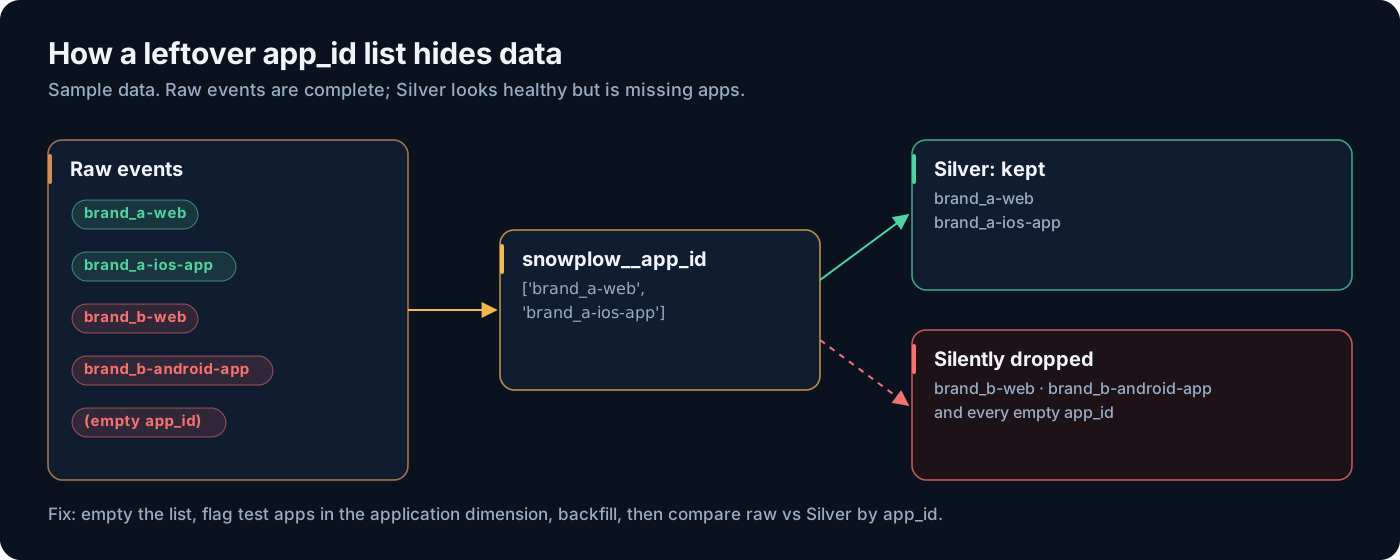
The fix had three parts. First, empty the list so the package processes everything. Second, handle test and dev apps downstream with an is_production flag on the application dimension, where the decision is visible and owned. Third, backfill. Here is the shape of the vars block we ended up with:
yaml# dbt_project.yml (sample values)
vars:
  snowplow_unified:
    snowplow__license_accepted: true
    snowplow__atomic_schema: atomic
    snowplow__events_table: events
    snowplow__start_date: '2024-01-01'      # earliest event you want modelled
    snowplow__backfill_limit_days: 30       # days processed per run during backfill
    snowplow__app_id: []                    # empty = all apps; filter test apps downstream
    snowplow__enable_web: true
    snowplow__enable_mobile: true
    snowplow__enable_screen_summary_context: true
    snowplow__list_event_counts: true
    snowplow__enable_conversions: true
    snowplow__conversion_events:
      - name: newsletter_signup
        condition: "event_name = 'newsletter_signup'"
  snowplow_media_player:
    snowplow__app_id: []
    snowplow__enable_mobile_events: true
  snowplow_ecommerce:
    snowplow__app_id: []
    snowplow__enable_mobile_events: true
Then add a check that compares Bronze with Silver by app. Run it after every deploy and on a schedule. It takes seconds and would have caught our problem on day one:
sql-- Views per app_id: raw events vs unified views, last 7 days
with raw_views as (
    select
        coalesce(nullif(app_id, ''), '(empty)') as app_id,
        count(distinct event_id)                as raw_view_events
    from atomic.events
    where event_name in ('page_view', 'screen_view')
      and collector_tstamp >= dateadd(day, -7, current_date)
    group by 1
),
modelled_views as (
    select
        coalesce(nullif(app_id, ''), '(empty)') as app_id,
        count(*)                                as unified_views
    from analytics.silver.snowplow_unified_views
    where start_tstamp >= dateadd(day, -7, current_date)
    group by 1
)
select
    coalesce(r.app_id, m.app_id)                          as app_id,
    coalesce(r.raw_view_events, 0)                        as raw_view_events,
    coalesce(m.unified_views, 0)                          as unified_views,
    round(coalesce(m.unified_views, 0)
          / nullif(r.raw_view_events, 0) * 100, 1)        as pct_modelled
from raw_views r
full outer join modelled_views m
    on r.app_id = m.app_id
order by pct_modelled nulls first, raw_view_events desc;
Expect a few percent difference from deduplication, bot filtering and the time window edges. What you are looking for is an app near zero. Sample output:
| app_id | raw_view_events | unified_views | pct_modelled |
|---|---|---|---|
| brand_b-android-app | 400,000 | 0 | 0.0 |
| (empty) | 5,000 | 0 | 0.0 |
| brand_c-web | 900,000 | 880,000 | 97.8 |
| brand_a-web | 1,200,000 | 1,180,000 | 98.3 |
Gotcha 2: backfilling means a full refresh, in batches
Fixing the allow-list does not repair history. The packages track progress in an incremental manifest, snowplow_unified_incremental_manifest, and normal runs carry on from where the manifest says they stopped. Missing apps from last year stay missing.
To rebuild, set snowplow__start_date to your earliest event and run a full refresh. The manifest tables are protected from being dropped in production, so you also pass snowplow__allow_refresh: true, as in dbt run --full-refresh --vars 'snowplow__allow_refresh: true'. Each run then processes at most snowplow__backfill_limit_days of data, so you run it again and again until it catches up. After that first full-refresh run, do not keep passing --full-refresh: ordinary runs read the manifest and continue the backfill from there.
Size the batch to your warehouse. A bigger snowplow__backfill_limit_days means fewer runs but longer, heavier ones. We tested a few values on a copy first and picked the largest one that finished comfortably inside the job timeout. Also note that everything downstream that was built incrementally from Silver needs its own rebuild once Silver is complete.
Gotcha 3: sessions.views is not the number of view rows
You would expect the views column on a session to equal the number of rows in snowplow_unified_views for that session. Often it does not. The session count is a distinct count of view_id across all of the session’s events, and page pings carry the view_id of the page they belong to.
Picture a reader who opens an article in a tab and leaves it there. After 30 minutes of inactivity the session ends. When they come back and scroll, the page pings start a new session. That new session counts the view, but the view row belongs to the earlier session. So the sum of sessions.views is higher than the count of view rows. Neither is wrong. They answer different questions. Pick one definition for “page views per session”, write it down, and use it everywhere.
Gotcha 4: iOS auto screen views are noisy
The mobile trackers can track screen views automatically. On iOS that hooks into view controllers, and not every view controller is a screen a person would recognise. We found ad containers and SwiftUI helper controllers recorded as screens. That inflated app screen views and put engaged time on ad controllers instead of articles.
Before you trust app view counts, run a simple group by screen_view__name on the views table and read the top 50 names with the app team. Then either exclude the noise in the tracker, or keep a reviewed list of excluded screen names in a seed and filter downstream. Do not bury that list in model SQL.
A short checklist before you trust Silver
snowplow__app_idis empty in every package, or you have a written reason why not.- Bronze vs Silver view counts by app_id are within a few percent for every app.
- Mobile flags are on in media player and ecommerce if your apps send those events.
- Every business-critical event is listed with where it lives: unified, a conversion, a passthrough, or your own model.
- One agreed definition of page views per session.
- Screen names reviewed with the app team.
- Ecommerce and media tables checked for empty steps, and the gaps sent to the tracking plan owner.
With Silver trustworthy, the next step is shaping it for analysts. In the next post we turn these tables into a Gold star schema with integer keys, clean dimensions and facts that hold only keys and measures.
Running Snowplow on dbt and not sure the numbers are complete?
We review Snowplow dbt configurations, reconcile raw events against modelled tables, and plan safe backfills. A short session usually finds the gaps.
Frequently Asked Questions
Which events does the Snowplow unified package model?
It builds view rows from page_view and screen_view events and uses page_ping events (and, with the screen summary context, screen_end and app background/foreground events) for engagement. Other events, including custom events, only appear as counts on the session when snowplow__list_event_counts is true.
What does snowplow__app_id do?
It is an allow-list. When it is empty (the default) the package processes every app_id. When it holds values, only those app_ids are processed, and events with a null or empty app_id are dropped too.
How do I backfill the Snowplow dbt packages?
Set snowplow__start_date to the earliest date you need and run dbt with --full-refresh and snowplow__allow_refresh set to true. Each run processes up to snowplow__backfill_limit_days of data. After that first run, ordinary runs continue from the incremental manifest until the backfill catches up.
Why are my ecommerce cart and checkout tables empty?
The ecommerce package only models the snowplow_ecommerce_action events your tracker sends. If you only track transactions, only the transaction table fills. Mobile ecommerce events also need snowplow__enable_mobile_events set to true.
Does the attribution package read raw Snowplow events?
No. It reads unified output: snowplow_unified_conversions, snowplow_unified_views and snowplow_unified_user_mapping by default. Enable the conversions module in unified before setting up attribution.
Need help building your data platform?
At CData Consulting, we design, build, and operate modern data infrastructure for companies across North America. Whether you are planning a migration, optimizing costs, or building from scratch — let's talk.
Get data engineering insights delivered to your inbox
Join our newsletter for weekly insights on Snowflake, data architecture, and modern analytics.