Snowplow on Snowflake: A Medallion Architecture for Behavioural Data
What Snowplow actually does, and how to lay it out on Snowflake from raw events to a real-time lane and a Gold star schema.
 Nitin Jain
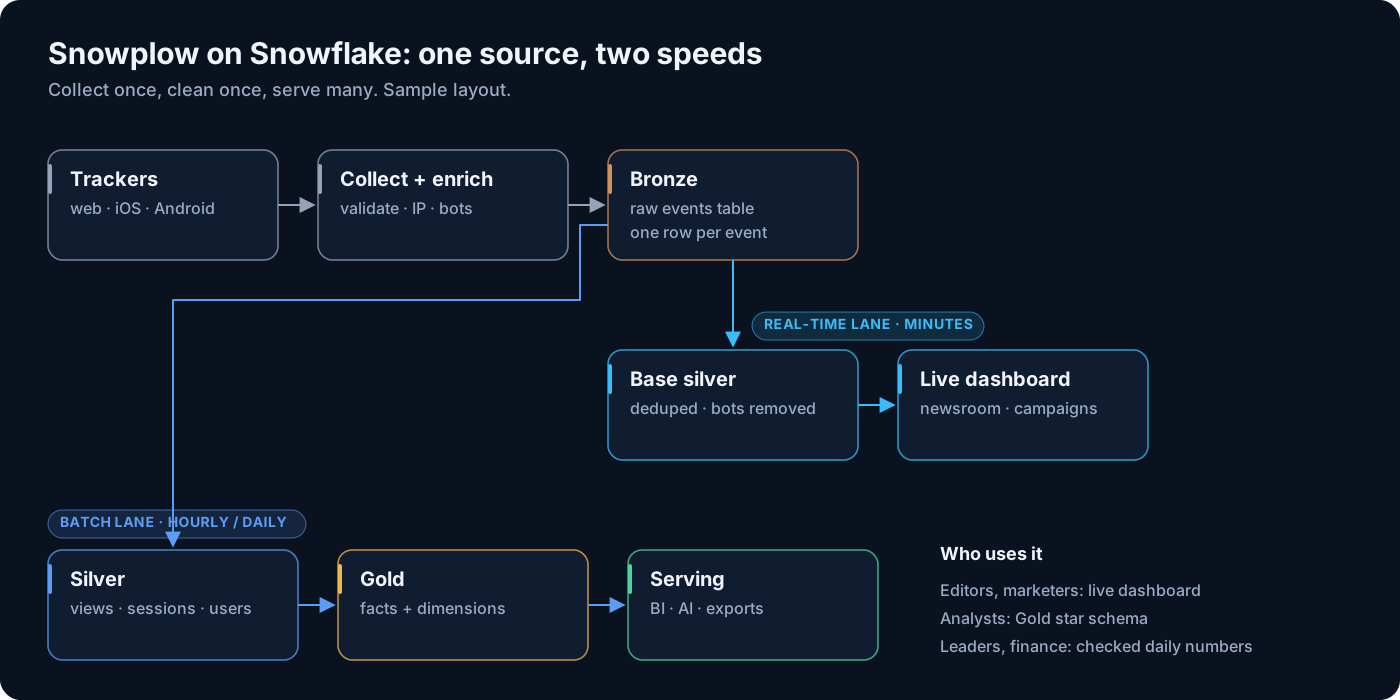
Most teams meet behavioural data through a vendor dashboard. You get page views, sessions and a bounce rate, and you take the numbers on trust. The day you want to join those clicks to subscriptions, content metadata or ad revenue, you find out the raw data is hard to get, sampled, or shaped by someone else’s definitions.
Snowplow takes the opposite approach. It collects every event, validates it against a schema you own, enriches it and lands it in your own warehouse. What you do with it from there is up to you. That freedom is the point, and it is also the risk: without a clear layout, a Snowplow warehouse turns into one huge table that every team queries in its own way.
This is the first post in a four-part series based on a recent project for a large digital publisher with several news brands, web and mobile apps. Here I cover what Snowplow does end to end, and the Snowflake layout we use for it: a medallion design with a real-time lane. All numbers below are illustrative sample data.
What Snowplow does, end to end
Snowplow is a pipeline, not a dashboard. It has five moving parts, and it helps to know what each one is responsible for before you design anything downstream.
| Component | What it does | What to watch |
|---|---|---|
| Trackers | SDKs for web (JavaScript), iOS, Android and server-side languages. They build events and send them over HTTP. | Tracker config decides what you can ever analyse. Auto-tracking can record things you did not mean to track. |
| Collector | A lightweight HTTP endpoint that accepts events and writes them to a stream (Kinesis, Pub/Sub or Kafka) as fast as possible. | It does no validation. It just has to stay up. |
| Enrich | Validates each event against its schema, then runs enrichments: IP to geo lookup, user-agent parsing, campaign and referrer parsing, IAB bot detection and more. | Events that fail validation go to a separate failed events stream, not into your table. Monitor it. |
| Iglu | The schema registry. Every custom event and entity has a versioned JSON Schema, for example iglu:com.acme/article/jsonschema/1-0-0. | Schemas are your data contract. Version them like code. |
| Loader | Writes enriched events into the warehouse. On Snowflake, the Snowflake Streaming Loader uses Snowpipe Streaming, so events arrive within seconds to a few minutes. | New schemas create new columns automatically. Plan for wide tables. |
The raw events table, entities and self-describing events
Everything lands in one wide table, usually atomic.events. Each row is one event: a page view, a page ping, a screen view, a link click, a custom event. The table has well over a hundred standard columns that every event shares, such as event_id, app_id, platform, event_name, collector_tstamp, derived_tstamp, domain_userid, domain_sessionid, user_id, page_url and the geo and user-agent fields filled by enrichment.
Two concepts carry everything else:
- Self-describing events are your own event types, such as
article_sharedorpaywall_shown. Each has an Iglu schema. On Snowflake they load into anOBJECTcolumn named after the schema, for exampleunstruct_event_com_acme_paywall_shown_1. - Entities (also called contexts) are extra objects attached to an event to describe the world around it: the article, the user, the device, the web page. One event can carry many entities. They load into
ARRAYcolumns such ascontexts_com_acme_article_1, one column per schema major version.
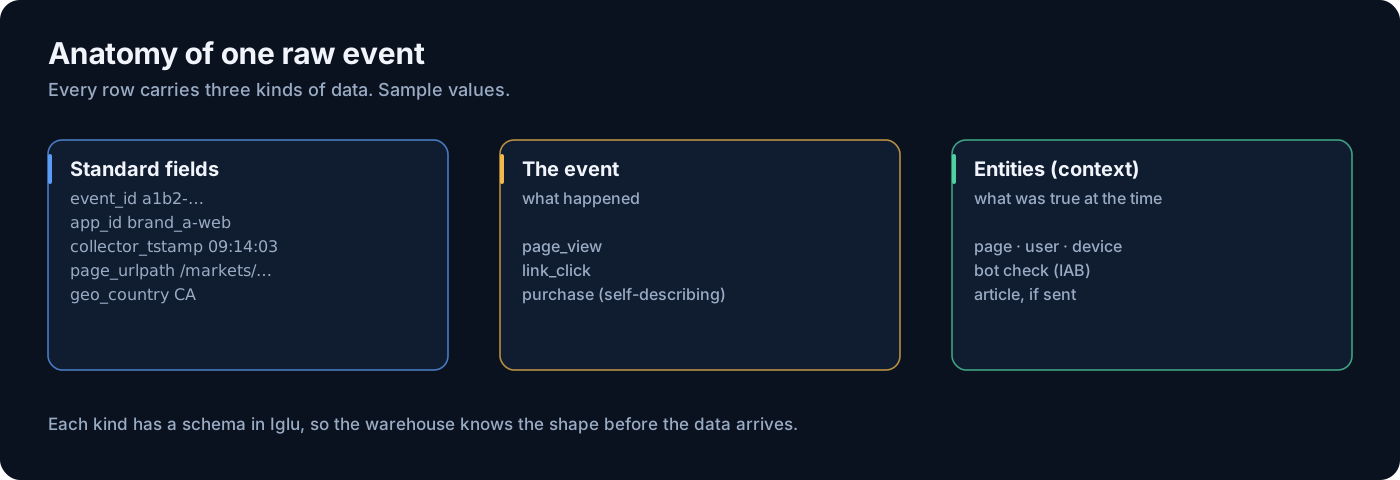
Because the values sit inside VARIANT, every field must be cast when you read it, for example contexts_com_acme_article_1[0]:articleId::varchar. That is fine for one analyst. It is not fine for fifty dashboards, each with its own casting, null handling and dedupe logic. This is the main reason the raw table should never be the thing people query.
Snowplow gives you clean, typed, schema-checked events. It does not give you a data model. Designing the layers on top is the real work.
Why medallion, and why a real-time lane
A medallion layout (Bronze, Silver, Gold) is not a fashion choice here. Behavioural data has three needs that pull against each other:
- Replay. You will change your modelling logic. When you do, you need the raw events to rebuild from. That is Bronze.
- Freshness. Some users care about the last five minutes, not last week. A newsroom watching a breaking story, a live ops team watching an app release. They need clean data fast, without waiting for a batch model.
- Consistency. Everyone else needs one definition of a session, a view and an engaged minute, joined to the business. That is Silver and Gold.
A plain batch medallion serves needs one and three but fails freshness. A pure streaming design serves freshness but makes sessions and history painful. The answer we use is a medallion with one extra, thin layer near the bottom: a real-time base silver that cleans events within minutes and can be read directly, while the heavier Silver and Gold layers run incrementally on their own schedule.
| Layer | What lives there | Refresh | Who uses it |
|---|---|---|---|
| Bronze | Raw atomic.events exactly as loaded, duplicates and bots included | Continuous (loader) | Data engineers, for replay and audit |
| Base silver | Same columns, deduplicated by event_id, bots removed, key entity fields flattened | 1 to 5 minutes | Real-time dashboards, live ops, the Silver models |
| Silver | Snowplow dbt package output: snowplow_unified_views, snowplow_unified_sessions, snowplow_unified_users | Incremental, e.g. hourly | Analytics engineers |
| Gold | Star schema: fct_page_view, fct_session, dim_content, dim_device, dim_geo, dim_application | Incremental, after Silver | Analysts, data scientists |
| Serving | Aggregates and semantic views with business names | After Gold | Business users, BI tools, AI assistants |
Bronze: keep it raw, keep it short
Bronze is the loader’s target table and nothing else. Do not add columns, do not delete rows, do not let dashboards point at it. Its only jobs are to receive events and to make replay possible.
Two decisions matter. First, retention. Raw events are the bulkiest data you own. Once Base silver and Silver are trusted, many teams keep only a short window of Bronze in the hot table (for example 7 to 14 days) and archive older raw data to cheaper storage, because rebuilds normally start from Base silver. Choose this on purpose, with your rebuild plan written down. Second, clustering. Most reads filter on time, so cluster or partition on collector_tstamp or load_tstamp, the same column your downstream models use for incremental windows.
Base silver: the real-time lane
Snowplow delivers events at least once, so duplicates of the same event_id do happen. Bots and crawlers also generate traffic that the IAB enrichment can flag. Base silver removes both, a minute or so after the event lands, and nothing more. Keep the logic small: the less it does, the cheaper and more reliable a 1-minute refresh is.
sql-- Base silver sketch on Snowflake (illustrative names)
create or replace dynamic table analytics.base_silver.events
  target_lag = '1 minute'
  warehouse  = transform_rt_wh
as
select
    e.*,
    e.contexts_com_acme_article_1[0]:articleId::varchar as article_id
from analytics.bronze.events e
where coalesce(
        e.contexts_com_iab_snowplow_spiders_and_robots_1[0]:spiderOrRobot::boolean,
        false
      ) = false
qualify row_number() over (
    partition by e.event_id
    order by e.collector_tstamp
) = 1;
Keeping the earliest collector_tstamp per event_id matches what the Snowplow dbt packages do themselves, so the real-time numbers and the Silver numbers agree. A newsroom or live ops dashboard can read this table directly, filtered to the last hour. Whether you build it as a dynamic table or with streams and tasks, and what a 1-minute versus 5-minute lag costs, is the subject of part four of this series.
Silver: let the Snowplow dbt packages do the hard part
Sessionisation, engaged time from page pings, user stitching and safe incremental processing are hard to write well. Snowplow publishes open-source dbt packages that do this, and we use them rather than rebuild them. The unified package covers web and mobile in one set of tables: snowplow_unified_views, snowplow_unified_sessions, snowplow_unified_users and snowplow_unified_user_mapping. Separate packages cover media playback, ecommerce and attribution.
The packages keep an incremental manifest, so each run only processes new events plus a lookback window. Point the package at Base silver rather than Bronze, so bot traffic never enters a session.
yaml# dbt_project.yml (illustrative)
vars:
  snowplow_unified:
    snowplow__atomic_schema: base_silver
    snowplow__events_table: events
    snowplow__start_date: '2026-01-01'
    snowplow__enable_web: true
    snowplow__enable_mobile: true
    # Leave empty to process every app_id.
    # Filter test and dev apps downstream instead.
    snowplow__app_id: []
That last variable deserves a warning. The package only processes the app IDs in snowplow__app_id. On one project, a short allow-list left over from an early pilot meant whole websites and Android apps were silently missing from Silver and everything downstream, while Bronze had them all. Our rule now: keep the list empty, flag test apps in dim_application, and reconcile event counts per app_id between Base silver and Silver every day.
Also know what the package does not model. The unified package builds views and sessions from page views, page pings, screen views and screen ends. Link clicks, app installs and your own custom events mostly survive only as counts on the session. If the business needs them as rows, you model them yourself. Part two goes through the packages in detail.
Gold: a star schema the business can read
Silver tables are wide and Snowplow-shaped. Gold reshapes them into facts and dimensions that match how the business talks: fct_page_view and fct_session at the centre, with dim_content, dim_page, dim_device, dim_geo, dim_application, dim_traffic_source and dim_person around them. Facts hold integer keys, IDs, timestamps and measures. Descriptive columns live in dimensions.
Gold is also where Snowplow data meets everything else: the CMS for article metadata, the subscription system for paying users, the enterprise date table you already own. A few principles we hold to:
- Reuse the enterprise date dimension. Do not build a second calendar just for clickstream.
- No hardcoded reference lists. Brand per
app_idor region per country belongs in a reference table or a dbt seed owned by the right team, not in acasestatement. Better still, have the tracker send the brand on every event as an entity. - Plan for late-arriving content. A view often arrives before the CMS knows about the article. Insert a placeholder dimension row from the event, then update it in place when the CMS row lands. The key never changes.
- Unknown is a value. Use reserved keys such as
-1Unknown and-2Not applicable so facts never carry null keys.
Part three covers surrogate keys, slowly changing dimensions and the clean-URL page dimension in depth.
Aggregates and serving views
The top layer exists so most people never write a join. Build a few aggregates that match real questions (daily views and engaged minutes by brand, content and platform; weekly active users by application) and expose them through semantic views with business names and descriptions. This is the layer BI tools and AI assistants should read. It is small, fast and cheap to query, and it carries one agreed definition of each metric.
sql-- Serving view sketch (illustrative)
create or replace view analytics.serving.daily_content_engagement as
select
    d.calendar_date,
    a.brand_name,
    a.platform,
    c.section_name,
    count(*)                                as page_views,
    count(distinct f.session_key)           as sessions,
    round(sum(f.engaged_time_seconds) / 60) as engaged_minutes
from analytics.gold.fct_page_view f
join analytics.gold.dim_date        d on f.date_key        = d.date_key
join analytics.gold.dim_application a on f.application_key = a.application_key
join analytics.gold.dim_content     c on f.content_key     = c.content_key
where a.is_test_app = false
group by 1, 2, 3, 4;
What this looks like in practice
With sample numbers: say a mid-sized publisher collects around 50 million events a day. Bronze grows by that much, plus a small share of duplicates. Base silver refreshes every minute and processes about a minute of data in a few seconds on a small warehouse. Silver runs hourly and turns those events into a few million views and sessions. Gold and the aggregates run after Silver. The live dashboard reads Base silver; the weekly editorial report reads a serving view; a data scientist building a churn model reads Gold. All three see the same deduplicated, bot-free events.
Before you commit to a refresh cadence, benchmark it. Build the Base silver table in parallel, run it for a few weeks at the lag you want, and look at credits per day against the value of fresher numbers. It is common to find that 5 minutes costs a fraction of 1 minute and nobody can tell the difference.
Checklist before you build
- Agree the tracking plan and Iglu schemas first. The warehouse cannot model what the tracker never sent.
- Turn on IAB bot detection and user-agent enrichment in Enrich.
- Monitor failed events. A broken schema version silently drops data from your table.
- Point dashboards at Base silver or serving views, never at Bronze.
- Leave
snowplow__app_idempty unless you have a strong reason, and reconcile counts per app between layers. - Write down who owns each layer, its refresh target and its retention.
Planning a Snowplow build on Snowflake?
We help teams design behavioural data platforms that are fast where it matters and consistent everywhere else: tracking plans, real-time layers, dbt package setup and Gold star schemas. Talk to us before the first event lands.
Frequently Asked Questions
Does Snowplow replace my web analytics tool?
It replaces the collection layer and gives you the raw, event-level data in your own warehouse. Dashboards, metric definitions and reports are yours to build on top, usually from Gold and serving views.
Why not let dashboards read the raw events table directly?
The raw table contains duplicates and bot traffic, and custom fields sit inside VARIANT columns that must be cast. Every dashboard would reimplement dedupe, bot filtering and casting differently, and the numbers would disagree.
Do I need the real-time base silver layer if I already run the dbt packages?
Only if someone needs numbers fresher than your Silver schedule. The packages run incrementally in batches. If a live dashboard needs the last few minutes, a thin deduplicated and bot-filtered layer is cheaper and simpler than running the full packages every minute.
How long should I keep Bronze data?
Long enough to rebuild from it safely. Many teams keep a short hot window in the raw table and archive older raw events to cheaper storage once downstream layers are trusted. Decide it together with your rebuild plan.
Which Snowplow dbt package should I start with?
For web and mobile apps, the unified package. It produces views, sessions, users and user mapping in one set of tables. Add the media player, ecommerce or attribution packages only if your trackers send those events.
Need help building your data platform?
At CData Consulting, we design, build, and operate modern data infrastructure for companies across North America. Whether you are planning a migration, optimizing costs, or building from scratch — let's talk.
Get data engineering insights delivered to your inbox
Join our newsletter for weekly insights on Snowflake, data architecture, and modern analytics.