From dbt Models to Conversational Analytics: Snowflake Cortex Meets the Semantic Layer
dbt unlocked analytics engineering. The semantic layer plus Snowflake Cortex Analyst is the next chapter — one metric definition, every consumer, including natural-language queries that route through governed SQL.
 Nitin Jain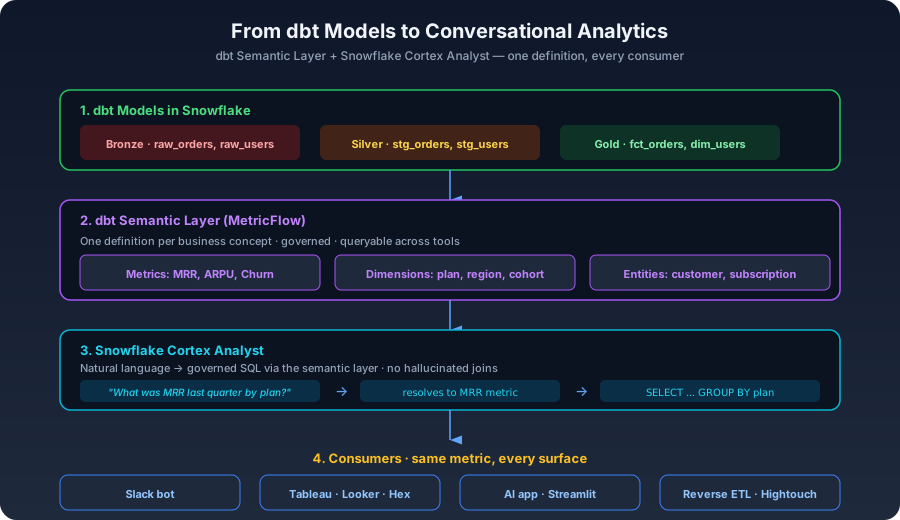
dbt did something quietly enormous a few years ago: it turned analysts into engineers. Anyone who could write SQL could now build trusted, version-controlled, tested data models in the warehouse. That is the move that created the modern analytics engineering role.
But dbt stopped at "tables." Once your models materialize, you hand them off to a BI tool — and that BI tool builds its own semantic layer to define metrics on top. Looker has LookML. Tableau has its data sources. Hex has its own. Notebooks have whatever the analyst typed inline. Six months later, MRR means three different things in three different places, and the finance team uses a fourth definition in their spreadsheet.
The metric-sprawl problem
This is the failure mode every mature data team eventually hits. The same KPI is recomputed in every consumer tool, drifts over time, and nobody can authoritatively say which version is right. The scariest part: the drift usually only gets discovered when an exec quotes a number that does not match the dashboard, and the data team spends a week reconciling.
The structural problem is that dbt models are tables, not metrics. A fct_orders table can serve five different revenue definitions depending on how you aggregate it. The metric is what the consumer tool layers on top — and that layer was, until recently, locked into each BI vendor.
dbt's Semantic Layer: one definition, every consumer
dbt's answer is MetricFlow — a semantic layer that lives in your dbt project. You define metrics, dimensions, and entities once, in YAML alongside your models. Any consumer can query the semantic layer through a query API and get the canonical metric back, computed consistently from the same dbt models.
The architecture in plain English: your dbt models still produce Bronze/Silver/Gold tables in Snowflake. On top of those, MetricFlow definitions describe what your business actually means by MRR, ARPU, churn — including which dimensions they can be sliced by, and which entities they relate to. The Semantic Layer API exposes those definitions to consumers. When a tool asks for "MRR by plan for last quarter," the API generates the right SQL against the right Gold table and returns the result.
Crucially, every consumer hits the same definition. Looker, Tableau, Hex, a Slack bot, a Streamlit app — all see the same MRR. The metric is governed in one place: your dbt project, in version control, reviewed in pull requests.
Snowflake Cortex Analyst: the LLM head on top
This is where the new chapter starts. Snowflake Cortex Analyst is an LLM service that takes a natural-language question — "What was MRR last quarter by plan?" — and routes it through your semantic layer to produce the right governed SQL.
The critical word in that sentence is "through." Cortex Analyst does not free-form generate SQL against your raw schema. That is the recipe for hallucinated joins and wrong metrics. Instead, the model is constrained to the semantic layer: it can pick from your defined metrics, your defined dimensions, your defined entities. If a user asks for something the semantic layer does not cover, the model says so, rather than guessing.
This is the architectural pattern that finally makes "ask your data in English" production-grade. Without a semantic layer, LLM-on-warehouse is a demo. With one, it becomes a real consumer surface — sitting alongside Looker, Tableau, and Hex, hitting the same governed metrics.
Why this changes analytics engineering
Analytics engineers become metric architects, not dashboard plumbers. The work shifts up the stack. Instead of building dashboard #47, an AE's job becomes "what does revenue mean here, what dimensions can it be sliced by, and how do we surface it everywhere consistently?" The dashboards mostly build themselves on top.
Business users self-serve common questions. The exec who used to wait two days for an analyst to pull a number can now ask a Slack bot. The volume of "I just need a quick number" requests drops by 60 to 80 percent in the teams I have seen this rolled out at. The remaining ad-hoc work — the genuinely novel analyses — still goes to analysts, where it should.
Governance gets tighter, not looser. Counterintuitively, putting an LLM in front of your warehouse increases governance pressure, because every wrong answer is now visible to a business user. That forces the metric definitions to be exactly right. Teams that adopt Cortex Analyst usually emerge with a much cleaner semantic layer than they started with.
The architecture in practice
A reasonable production setup looks like:
1. dbt models in Snowflake — Bronze (raw), Silver (cleaned, conformed), Gold (modeled facts and dimensions). Tested, documented, materialized incrementally where it matters.
2. MetricFlow definitions — YAML files in your dbt project that define every business metric: MRR, ARPU, churn, NRR, paid-conversion-rate. Each metric specifies its time grain, allowed dimensions, and the entities it relates to.
3. Cortex Analyst API — configured to use your semantic layer as its grounding context. Optionally augmented with a vector index of past questions for few-shot examples.
4. Consumer surfaces — a Slack bot for ad-hoc questions, a Streamlit or AI app embedded in your internal tools, a Hex notebook for analysts who want to pin natural-language queries into reports, plus the existing BI tools (Looker, Tableau) querying the same semantic layer for governance.
Pitfalls to plan for
Metric ambiguity. "Show me revenue" — gross or net? Recognized or invoiced? You will discover, very publicly, that your business does not have a single answer to questions you assumed were settled. Plan for a metric-canonicalization phase before you roll out conversational analytics.
Dimensions outside the semantic layer. If a user asks to slice MRR by a dimension you have not defined, Cortex will (correctly) refuse — but users will read that as "the AI is broken." Curate your dimensions aggressively and add new ones based on real query logs.
Governance still matters. The semantic layer is your governance surface. If the metric definitions are wrong, every consumer is now wrong. Get your test coverage right on the underlying dbt models before you put an LLM in front of them.
Cost. Cortex Analyst calls are not free, and a Slack bot that gets popular can rack up surprising token bills. Set per-user quotas and track cost per metric query like you would track warehouse spend.
Where to start
Pick the five metrics that matter most to your business — the ones the exec team asks about every week. Define them in MetricFlow. Wire up Cortex Analyst to those five metrics only, and roll it out as a Slack bot to a single team. Iterate on the misses for two months. Then expand.
The teams I have seen win with this pattern are the ones who treated the semantic layer as the product, and Cortex as a consumer of it. The teams that struggled were the ones who treated Cortex as a magic box and skipped the metric work. The order is: governance first, semantic layer second, conversational analytics third. Skip the order, skip the value.
Frequently Asked Questions
Does Snowflake Cortex Analyst replace BI tools?
No, and it should not. Cortex handles the "I just need a quick number" queries — what was MRR last quarter, what is churn this month, how many users signed up yesterday. BI tools still own pinned dashboards, deep cohort analyses, custom visualizations, and anything that requires a non-trivial UI. The right framing is that Cortex is another consumer of your semantic layer, sitting alongside Looker and Tableau.
Can Cortex query data that is not in the semantic layer?
Technically yes, but accuracy drops sharply. The whole architectural value is that Cortex is grounded in the semantic layer — it picks from defined metrics and dimensions rather than free-form generating SQL. If you let it query raw tables, you are back to the hallucination problem that makes most "AI on your data" demos unsuitable for production. Curate aggressively.
How does the dbt Semantic Layer compare to Looker LookML?
Conceptually similar — both define metrics, dimensions, and entities once, then expose them to consumers. The practical difference is portability: dbt's semantic layer is open-source and queryable from any consumer (including non-Looker tools and APIs like Cortex). LookML is locked to Looker. For teams that want a single source of truth across multiple BI tools and AI consumers, the dbt approach wins.
What is the realistic timeline to roll this out?
Two to three weeks to define your top five metrics in MetricFlow if your dbt models are healthy. Another two weeks to wire up Cortex Analyst and a Slack bot. Two months of iteration on misses before you can confidently expand to more metrics and a wider audience. The longest phase is almost always the metric-canonicalization conversation with stakeholders, which should happen up front.
Need help building your data platform?
At CData Consulting, we design, build, and operate modern data infrastructure for companies across North America. Whether you are planning a migration, optimizing costs, or building from scratch — let's talk.
Get data engineering insights delivered to your inbox
Join our newsletter for weekly insights on Snowflake, data architecture, and modern analytics.