The Enterprise Guide to Snowflake Cost Optimization: Proven Strategies to Cut Spend by 40–60%
How enterprise teams can dramatically reduce Snowflake costs through warehouse right-sizing, auto-suspend policies, resource monitors, and governance frameworks.
 Nitin Jain
Snowflake's consumption-based pricing model is powerful — but without proper governance, costs can spiral quickly. We've helped enterprise clients reduce their Snowflake spend by 40–60% without sacrificing performance. This guide shares the proven strategies we use.
Why Snowflake Costs Get Out of Control
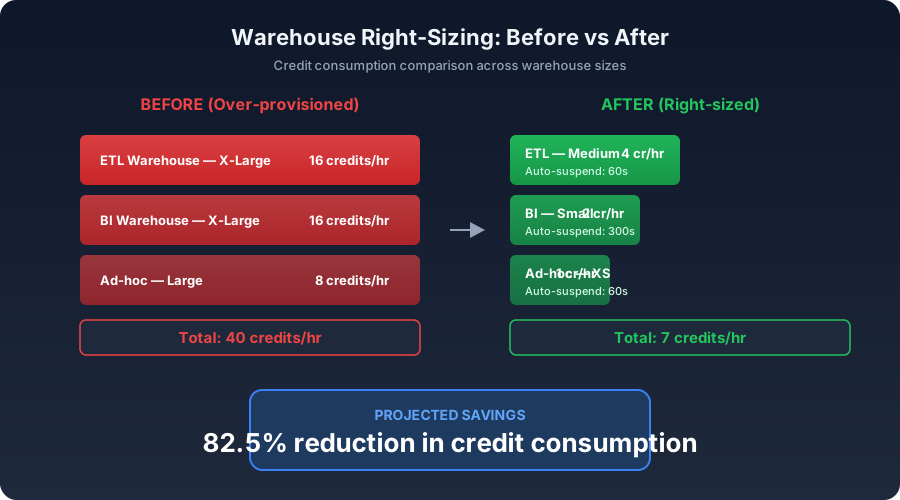
Most organizations adopt Snowflake for its elastic compute and separation of storage and compute. But that same flexibility creates risk: any team can spin up warehouses, run expensive queries, or leave compute running idle. Without guardrails, monthly bills balloon from thousands to hundreds of thousands of dollars.
The three biggest cost drivers we see are: oversized warehouses running at 10–20% utilization, long auto-suspend timers (or none at all), and unoptimized queries scanning entire tables instead of leveraging clustering and pruning.
Strategy 1: Warehouse Right-Sizing
Most teams default to X-Large or 2X-Large warehouses "just in case." In reality, 80% of workloads run efficiently on Small or Medium warehouses. We audit query patterns using QUERY_HISTORY and WAREHOUSE_METERING_HISTORY to identify the optimal size for each workload. A common finding: reducing a warehouse from XL to Medium cuts credit consumption by 75% with minimal impact on query duration.
Strategy 2: Auto-Suspend and Auto-Resume Policies
Snowflake charges for every second a warehouse is running. Setting auto-suspend to 60 seconds (from the default 600) can save 30–50% on idle compute. For ETL warehouses that run on a schedule, we configure auto-suspend to 60 seconds and rely on auto-resume to start them only when queries arrive. For interactive/BI warehouses, 120–300 seconds balances responsiveness with cost.
Strategy 3: Resource Monitors and Alerts
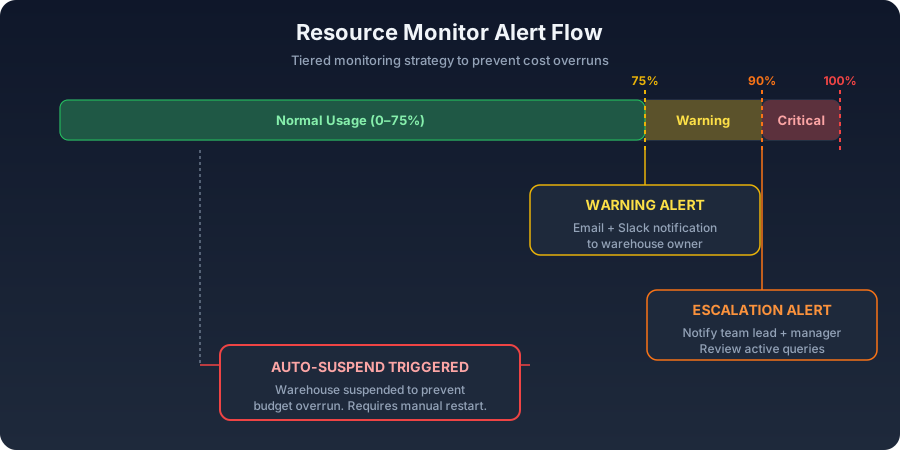
Snowflake's built-in resource monitors let you set credit quotas at the account or warehouse level. We configure tiered alerts: a warning at 75% of the monthly budget, a notification at 90%, and an auto-suspend at 100%. This prevents runaway costs from a single bad query or misconfigured pipeline. Combined with Slack or email alerting, teams get real-time visibility into spend.
Strategy 4: Query Optimization and Tagging
Query tagging with QUERY_TAG allows teams to attribute costs to specific projects, teams, or pipelines. We implement a tagging taxonomy (e.g., team:marketing, pipeline:daily-etl) and build dashboards showing cost-per-team and cost-per-pipeline. This creates accountability and surfaces the most expensive workloads for optimization. Common quick wins include replacing SELECT * with specific columns, adding clustering keys to large tables, and using materialized views for repeated aggregations.
Strategy 5: Zero-Copy Cloning for Dev/Test
Many organizations maintain full copies of production data for development and testing, doubling or tripling storage costs. Snowflake's zero-copy cloning creates instant copies that share the underlying storage — you only pay for changes. We helped a leading North American commercial real estate firm eliminate $15,000/month in redundant storage by replacing nightly data copies with zero-copy clones.
Building a Cost Governance Framework
Technology alone isn't enough. Sustainable cost optimization requires a governance framework that includes: designated warehouse owners responsible for their compute spend, quarterly cost reviews comparing actual vs. budgeted credits, automated policies enforced through Snowflake's access controls and resource monitors, and a cost optimization runbook that new team members follow when provisioning warehouses.
Real-World Results
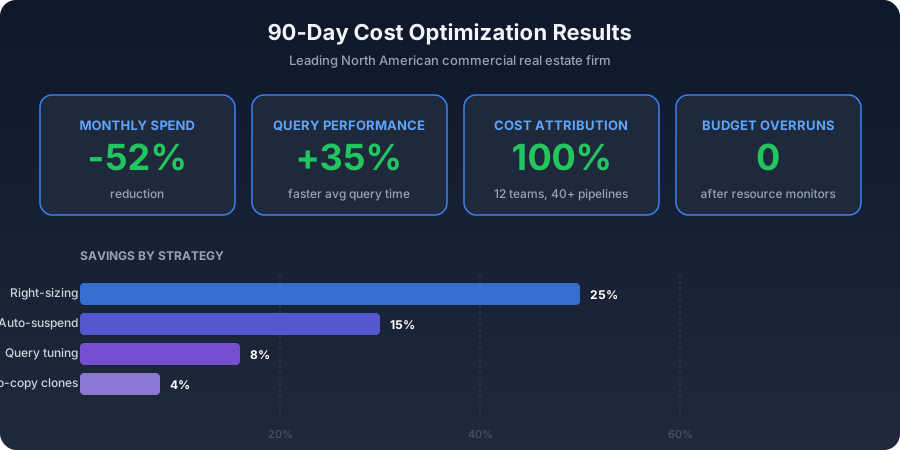
For a leading North American commercial real estate firm, we implemented these strategies across their Snowflake environment. Results after 90 days: 52% reduction in monthly Snowflake spend, average query performance improved by 35% (smaller warehouses with better-optimized queries), complete cost attribution across 12 teams and 40+ pipelines, and zero instances of budget overrun after implementing resource monitors.
Getting Started
Start with a cost audit. Run the WAREHOUSE_METERING_HISTORY and QUERY_HISTORY views for the past 30 days. Identify your top 10 most expensive warehouses and queries. Most organizations find 30% or more in savings from warehouse right-sizing alone. From there, layer in auto-suspend policies, resource monitors, and query tagging to build a comprehensive cost governance program.
Frequently Asked Questions
How quickly can we see cost savings in Snowflake?
Most organizations see 20–30% savings within the first two weeks from warehouse right-sizing and auto-suspend policy changes alone. Full optimization with governance frameworks typically delivers 40–60% savings within 90 days.
Does reducing warehouse size impact query performance?
Not necessarily. Many warehouses are oversized for their workloads. Right-sizing to match actual query complexity often maintains or even improves performance because Snowflake's optimizer works more efficiently with appropriately sized compute resources.
What is the best auto-suspend setting for Snowflake warehouses?
For ETL/batch warehouses, 60 seconds is optimal. For interactive/BI warehouses, 120–300 seconds balances user experience with cost savings. The default 600 seconds is almost always too long.
Need help building your data platform?
At CData Consulting, we design, build, and operate modern data infrastructure for companies across North America. Whether you are planning a migration, optimizing costs, or building from scratch — let's talk.
Get data engineering insights delivered to your inbox
Join our newsletter for weekly insights on Snowflake, data architecture, and modern analytics.