
Apache Iceberg on Snowflake: A Decision Framework for Enterprise Data Teams
When to use managed vs external Iceberg tables, how Iceberg compares to Delta Lake, and a practical decision matrix for enterprise adoption.
Apache Iceberg has emerged as the leading open table format for enterprise data platforms. With Snowflake's native Iceberg support, teams now face a critical decision: when to use Iceberg tables, which type to choose, and how this fits into their broader data architecture.
What Is Apache Iceberg?
Apache Iceberg is an open table format designed for huge analytic datasets. It provides ACID transactions, schema evolution, partition evolution, and time travel — capabilities previously locked inside proprietary systems. Unlike traditional Hive-style partitioning, Iceberg uses hidden partitioning and metadata trees that enable efficient query planning without requiring users to know the physical data layout.
Snowflake's Two Iceberg Table Types
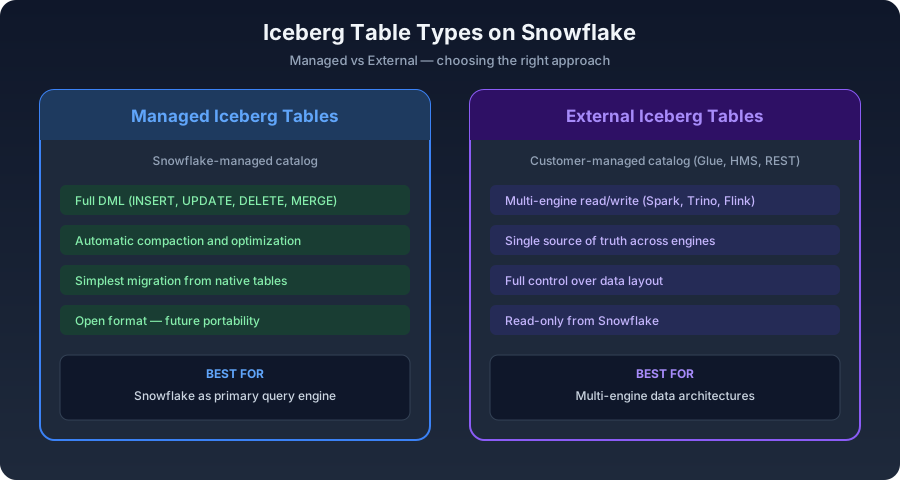
Snowflake offers two approaches to Iceberg tables, each suited to different use cases. Managed Iceberg Tables (Snowflake-managed catalog) are best when Snowflake is your primary query engine. Snowflake manages the Iceberg metadata and data files, providing full DML support (INSERT, UPDATE, DELETE, MERGE), automatic compaction and optimization, and the simplest migration path from existing Snowflake tables.
External Iceberg Tables (customer-managed catalog) are best for multi-engine architectures. You manage the Iceberg catalog (AWS Glue, Hive Metastore, or REST catalog) and Snowflake reads the data. This provides read access from Snowflake to data written by Spark, Trino, or Flink, a single source of truth accessible by multiple engines, and full control over data layout and compaction schedules.
Decision Matrix: When to Use Each Type
Choose Managed Iceberg Tables when: Snowflake is your primary or sole query engine, you want the simplest operational model, you need full DML support from Snowflake, and your priority is reducing vendor lock-in for future flexibility. Choose External Iceberg Tables when: multiple engines (Spark, Trino, Flink) need to read and write the same data, you have an existing Iceberg catalog (AWS Glue, Hive Metastore), data is produced by non-Snowflake systems, or you need to optimize for multi-cloud or multi-engine portability.
Iceberg vs Delta Lake: An Honest Comparison
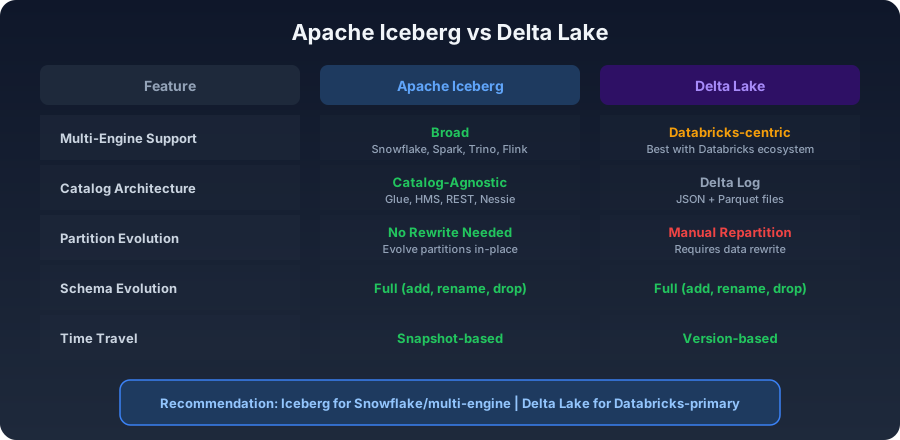
Both Iceberg and Delta Lake are open table formats, but they differ in important ways. Ecosystem support: Iceberg has broader multi-engine support (Snowflake, Spark, Trino, Flink, Dremio, StarRocks) while Delta Lake is strongest in the Databricks ecosystem. Catalog architecture: Iceberg's catalog-agnostic design allows any catalog implementation, while Delta Lake relies on the Delta Log (a set of JSON and Parquet files). Partition evolution: Iceberg supports partition evolution without rewriting data — a significant advantage for evolving schemas. Delta Lake requires manual repartitioning.
Our recommendation: if your primary platform is Snowflake or you need multi-engine interoperability, choose Iceberg. If your primary platform is Databricks, Delta Lake is the natural choice. For organizations using both, Databricks' UniForm feature can write data in both formats simultaneously.
Multi-Engine Interoperability: The Real Promise
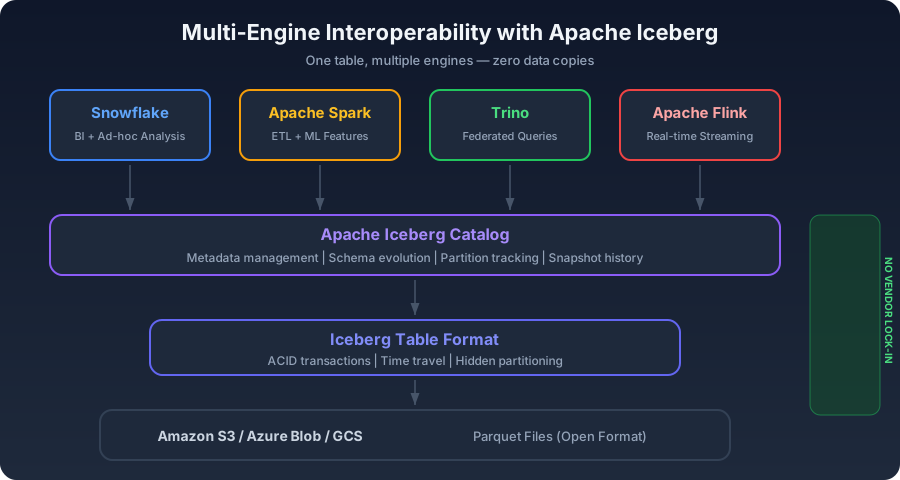
The most compelling reason to adopt Iceberg is multi-engine interoperability. A single Iceberg table stored on S3 can be queried by Snowflake for BI and ad-hoc analysis, Spark for complex transformations and ML feature engineering, Trino for federated queries across multiple data sources, and Flink for real-time streaming ingestion. This eliminates data copies, reduces storage costs, and ensures every engine reads the same consistent data.
Reducing Vendor Lock-In
One of Iceberg's strongest value propositions is reducing vendor lock-in. With data stored in open Parquet files and metadata in an open format, you're never locked into a single compute engine. If Snowflake's pricing changes unfavorably, you can query the same data with Trino or Spark. If a new query engine emerges with better price-performance, you can adopt it without migrating data. This optionality has real financial value, especially for enterprise data platforms with multi-year horizons.
Getting Started with Iceberg on Snowflake
Start with a pilot: convert one or two non-critical tables to managed Iceberg format and measure the impact on query performance and storage costs. If you have multi-engine requirements, set up an external catalog (AWS Glue is the simplest option) and create external Iceberg tables in Snowflake. Most organizations find that Iceberg adds minimal overhead while providing significant strategic value in terms of flexibility and future-proofing.
Frequently Asked Questions
Do Iceberg tables perform differently than regular Snowflake tables?
Managed Iceberg tables in Snowflake perform comparably to native tables for most workloads. External Iceberg tables may have slightly higher latency for metadata operations but query execution performance is similar once data is scanned.
Can I convert existing Snowflake tables to Iceberg format?
Yes. Snowflake supports converting existing managed tables to Iceberg format using ALTER TABLE ... CONVERT TO ICEBERG. This is a metadata operation and does not require rewriting the underlying data.
What is the difference between Iceberg and Delta Lake?
Both are open table formats, but Iceberg has broader multi-engine support and catalog flexibility, while Delta Lake is strongest in the Databricks ecosystem. Iceberg also supports partition evolution without data rewrites, which is a significant advantage for evolving schemas.
Need help building your data platform?
At CData Consulting, we design, build, and operate modern data infrastructure for companies across North America. Whether you are planning a migration, optimizing costs, or building from scratch — let's talk.